<?xml version="1.0" encoding="utf-8"?>
<feed xmlns="http://www.w3.org/2005/Atom">

 <title>joe shaw</title>
 <link href="/atom.xml" rel="self"/>
 <link href=""/>
 <updated>2012-01-11T09:56:29-05:00</updated>
 <id>atom.xml</id>
 <author>
   <name>Joe Shaw</name>
   <email>joe@joeshaw.org</email>
   <uri></uri>
 </author>

 
 <entry>
   <title>terrible vagrant/virtualbox performance on mac os x</title>
   <link href="http://joeshaw.org//2011/09/30/terrible-vagrant-virtualbox-performance-on-mac-os-x/"/>
   <published>2011-09-30T11:00:00-04:00</published>


   <updated>2011-09-30T11:00:00-04:00</updated>
   <id>http://joeshaw.org//2011/09/30/terrible-vagrant-virtualbox-performance-on-mac-os-x</id>
   <content type="html">&lt;p&gt;I almost made it a year without a blog post.&lt;/p&gt;

&lt;p&gt;I recently started using &lt;a href=&quot;http://vagrantup.com&quot;&gt;Vagrant&lt;/a&gt; to test our
auto-provisioning of servers with &lt;a href=&quot;http://puppetlabs.com&quot;&gt;Puppet&lt;/a&gt;.
Having a simple-yet-configurable system for starting up and accessing
headless virtual machines really makes this a much simpler solution
than VMware Fusion.  (Although I wish Vagrant had a way to take and
rollback VM snapshots.)&lt;/p&gt;

&lt;p&gt;Unfortunately, as soon as I tried to really do anything in the VM my
Mac would completely bog down.  Eventually the entire UI would stop
updating.  In Activity Monitor, the dreaded kernel_task was taking
100% of one CPU, and VBoxHeadless taking most of another.  Things
would eventually free up whenever the task in the VM (usually &lt;code&gt;apt-get
install&lt;/code&gt; or &lt;code&gt;puppet apply&lt;/code&gt;) would crash with a segmentation fault.&lt;/p&gt;

&lt;p&gt;Digging into this, I found an ominous message in the VirtualBox logs:&lt;/p&gt;

&lt;pre&gt;&lt;code&gt;AIOMgr: Host limits number of active IO requests to 16. Expect a performance impact.
&lt;/code&gt;&lt;/pre&gt;

&lt;p&gt;Yeah, no kidding.  I tracked this message down to the &quot;Use host I/O
cache&quot; setting being off on the SATA Controller in the box.  (This is
a per-VM setting, and I am using the stock Vagrant &quot;lucid64&quot; box, so
the exact setting may be somewhere else for you.  It's probably a good
idea to turn this setting on for all storage controllers.)&lt;/p&gt;

&lt;p&gt;When it comes to Vagrant VMs, this setting in the VirtualBox UI is not
very helpful, though, because Vagrant brings up new VMs automatically
and without any UI.  To get this to work with the Vagrant workflow,
you have to do the following hacky steps:&lt;/p&gt;

&lt;ol&gt;
&lt;li&gt;Turn off any IO-heavy provisioning in your Vagrantfile&lt;/li&gt;
&lt;li&gt;&lt;code&gt;vagrant up&lt;/code&gt; a new VM&lt;/li&gt;
&lt;li&gt;&lt;code&gt;vagrant halt&lt;/code&gt; the VM&lt;/li&gt;
&lt;li&gt;Open the VM in the VirtualBox UI and change the setting&lt;/li&gt;
&lt;li&gt;Re-enable the provisioning in your Vagrantfile&lt;/li&gt;
&lt;li&gt;&lt;code&gt;vagrant up&lt;/code&gt; again&lt;/li&gt;
&lt;/ol&gt;


&lt;p&gt;This is not going to work if you have to bring up new VMs often.&lt;/p&gt;

&lt;p&gt;Fortunately this setting is easy to tweak in the base box.  Open up
&lt;code&gt;~/.vagrant.d/boxes/base/box.ovf&lt;/code&gt; and find the &lt;code&gt;StorageController&lt;/code&gt; node.
You'll see an attribute &lt;code&gt;HostIOCache=&quot;false&quot;&lt;/code&gt;.  Change that value to
&lt;code&gt;true&lt;/code&gt;.&lt;/p&gt;

&lt;p&gt;Lastly, you'll have to update the SHA1 hash of the &lt;code&gt;.ovf&lt;/code&gt; file in
&lt;code&gt;~/.vagrant.d/boxes/base/box.mf&lt;/code&gt;.  Get the new hash by running
&lt;code&gt;openssl dgst -sha1 ~/.vagrant.d/boxes/base/box.ovf&lt;/code&gt; and replace the
old value in &lt;code&gt;box.mf&lt;/code&gt; with it.&lt;/p&gt;

&lt;p&gt;That's it.  All subsequent VMs you create with &lt;code&gt;vagrant up&lt;/code&gt; will now
have the right setting.&lt;/p&gt;
</content>
 </entry>
 
 <entry>
   <title>linux input ecosystem</title>
   <link href="http://joeshaw.org//2010/10/01/681/"/>
   <published>2010-10-01T15:27:24-04:00</published>


   <updated>2010-10-01T15:27:24-04:00</updated>
   <id>http://joeshaw.org//2010/10/01/681</id>
   <content type="html">&lt;p&gt;Over the past couple of days, I&amp;#8217;ve been trying to figure out how input in Linux works on modern systems.  There are lots of small pieces at various levels, and it&amp;#8217;s hard to understand how they all interact.  Things are not helped by the fact that things have changed quite a bit over the past couple of years as &lt;a href=&quot;http://freedesktop.org/wiki/Software/hal&quot;&gt;&lt;span class=&quot;caps&quot;&gt;HAL&lt;/span&gt;&lt;/a&gt; &amp;#8212; which I helped write &amp;#8212; has been giving way to &lt;a href=&quot;http://www.kernel.org/pub/linux/utils/kernel/hotplug/udev.html&quot;&gt;udev&lt;/a&gt;, and existing literature is largely out of date.  This is my attempt at understanding how things work today, in the Ubuntu Lucid release.&lt;/p&gt;
&lt;h3&gt;kernel&lt;/h3&gt;
&lt;p&gt;In the Linux kernel&amp;#8217;s input system, there are two pieces: the &lt;em&gt;device driver&lt;/em&gt; and the &lt;em&gt;event driver&lt;/em&gt;.  The device driver talks to the hardware, obviously.  Today, for most &lt;span class=&quot;caps&quot;&gt;USB&lt;/span&gt; devices this is handled by the &lt;em&gt;usbhid&lt;/em&gt; driver.  The event drivers handle how to expose the events generated by the device driver to userspace.  Today this is primarily done through &lt;em&gt;evdev&lt;/em&gt;, which creates character devices (typically named &lt;tt&gt;/dev/input/event&lt;em&gt;N&lt;/em&gt;&lt;/tt&gt;) and communicates with them through &lt;em&gt;struct input_event&lt;/em&gt; messages.  See &lt;tt&gt;&lt;a href=&quot;http://lxr.free-electrons.com/source/include/linux/input.h&quot;&gt;include/linux/input.h&lt;/a&gt;&lt;/tt&gt; for its definition.&lt;/p&gt;
&lt;p&gt;A great tool to use for getting information about evdev devices and events is &lt;a href=&quot;http://packages.ubuntu.com/search?keywords=evtest&quot;&gt;evtest&lt;/a&gt;.&lt;/p&gt;
&lt;p&gt;A somewhat outdated but still relevant description of the kernel input system can be found in the kernel&amp;#8217;s &lt;tt&gt;&lt;a href=&quot;http://lxr.free-electrons.com/source/Documentation/input/input.txt&quot;&gt;Documentation/input/input.txt&lt;/a&gt;&lt;/tt&gt; file.&lt;/p&gt;
&lt;h3&gt;udev&lt;/h3&gt;
&lt;p&gt;When a device is connected, the kernel creates an entry in sysfs for it and generates a hotplug event.  That hotplug event is processed by udev, which applies some policy, attaches additional properties to the device, and ultimately creates a device node for you somewhere in &lt;tt&gt;/dev&lt;/tt&gt;.&lt;/p&gt;
&lt;p&gt;For input devices, the rules in &lt;tt&gt;/lib/udev/rules.d/60-persistent-input.rules&lt;/tt&gt; are executed.  Among the things it does is run a &lt;tt&gt;/lib/udev/input_id&lt;/tt&gt; tool which queries the capabilities of the device from its sysfs node and sets environment variables like ID_INPUT_KEYBOARD, ID_INPUT_TOUCHPAD, etc. in the udev database.&lt;/p&gt;
&lt;p&gt;For more information on &lt;tt&gt;input_id&lt;/tt&gt; see the &lt;a href=&quot;http://www.spinics.net/lists/hotplug/msg03174.html&quot;&gt;original announcement email&lt;/a&gt; to the hotplug list.&lt;/p&gt;
&lt;h3&gt;X&lt;/h3&gt;
&lt;p&gt;X has a udev config backend which queries udev for the various input devices.  It does this at startup and also watches for hotplugged devices.  X looks at the different ID_INPUT_* properties to determine whether it&amp;#8217;s a keyboard, a mouse, a touchpad, a joystick, or some other device.  This information can be used in &lt;tt&gt;/usr/lib/X11/xorg.conf.d&lt;/tt&gt; files in the form of MatchIsPointer, MatchIsTouchpad, MatchIsJoystick, etc. in InputClass sections to see whether to apply configuration to a given device.&lt;/p&gt;
&lt;p&gt;Xorg has a handful of its own drivers to handle input devices, including evdev, synaptics, and joystick.  And here is where things start to get confusing.&lt;/p&gt;
&lt;p&gt;Linux has this great generic event interface in evdev, which means that very few drivers are needed to interact with hardware, since they&amp;#8217;re not speaking device-specific protocols.  Of the few needed on Linux nearly all of them speak evdev, including the three I listed above.&lt;/p&gt;
&lt;p&gt;The evdev driver provides basic keyboard and mouse functionality, speaking &amp;#8212; obviously &amp;#8212; evdev through the &lt;tt&gt;/dev/input/event&lt;em&gt;N&lt;/em&gt;&lt;/tt&gt; devices.  It also handles things like the lid and power switches.  This is the basic, generic input driver for Xorg on Linux.&lt;/p&gt;
&lt;p&gt;The synaptics driver is the most confusing of all.  It &lt;em&gt;also speaks evdev to the kernel&lt;/em&gt;.  On Linux it does not talk to the hardware directly, and is in no way Synaptics&amp;#8482; hardware-specific.  The synaptics driver is simply a separate driver from evdev which adds a lot of features expected of touchpad hardware, for example two-finger scrolling.  It should probably be renamed the &amp;#8220;touchpad&amp;#8221; module, except that on non-Linux OSes it can still speak the Synaptics protocol.&lt;/p&gt;
&lt;p&gt;The joystick driver similarly handles joysticky things, but speaks evdev to the kernel rather than some device-specific protocol.&lt;/p&gt;
&lt;p&gt;X only has concepts of keyboards and pointers, the latter of which includes mice, touchpads, joysticks, wacom tablets, etc.  X also has the concept of the &lt;em&gt;core&lt;/em&gt; keyboard and pointer, which is how events are most often delivered to applications.  By default all devices send core events, but certain setups might want to make devices non-core.&lt;/p&gt;
&lt;p&gt;If you want to receive events for non-core devices, you need to use the XInput or XInput2 extensions for that.  XInput exposes core-like events (like DeviceMotionNotify and DeviceButtonPress), so it is not a major difficulty to use, although its setup is annoyingly different than most other X extensions.  I have not used XInput2.&lt;/p&gt;
&lt;p&gt;&lt;a href=&quot;http://who-t.blogspot.com/&quot;&gt;Peter Hutterer&amp;#8217;s blog&lt;/a&gt; is an excellent resource for all things input related in X.&lt;/p&gt;</content>
 </entry>
 
 <entry>
   <title>cherry picking a range of commits</title>
   <link href="http://joeshaw.org//2010/06/22/667/"/>
   <published>2010-06-22T09:07:48-04:00</published>


   <updated>2010-06-22T09:07:48-04:00</updated>
   <id>http://joeshaw.org//2010/06/22/667</id>
   <content type="html">&lt;p&gt;At &lt;a href=&quot;http://litl.com&quot;&gt;work&lt;/a&gt; we use git, and I often want to cherry pick a series of commits from a development branch, but don&amp;#8217;t want to merge the whole branch for whatever reason.  I put out &lt;a href=&quot;http://twitter.com/joeshaw/status/16483721670&quot;&gt;a call on Twitter&lt;/a&gt; for ideas, and got a handful of good ones back.&lt;/p&gt;
&lt;p&gt;&lt;b&gt;Update, 27 July 2010:&lt;/b&gt; git 1.7.2 released earlier this week, has support for passing a range of commits to &lt;tt&gt;git cherry-pick&lt;/tt&gt;.  See the &lt;a href=&quot;http://www.kernel.org/pub/software/scm/git/docs/RelNotes-1.7.2.txt&quot;&gt;release notes&lt;/a&gt;.  For my pre-1.7.2 solution, read on.&lt;/p&gt;
&lt;ul&gt;
	&lt;li&gt;&lt;a href=&quot;http://twitter.com/sandyarmstrong&quot;&gt;Sandy&lt;/a&gt; pointed to &lt;a href=&quot;http://people.gnome.org/~federico/news-2009-06.html#04&quot;&gt;a Federico blog post&lt;/a&gt; which formats the commit range as patches, changes branches, and re-applies them.  &lt;a href=&quot;http://twitter.com/lyager&quot;&gt;@lyager&lt;/a&gt; also &lt;a href=&quot;http://twitter.com/lyager/status/16484683259&quot;&gt;recommended&lt;/a&gt; this method.&lt;/li&gt;
	&lt;li&gt;Federico himself &lt;a href=&quot;http://twitter.com/federicomena/status/16485552052&quot;&gt;suggested&lt;/a&gt; &lt;a href=&quot;http://twitter.com/federicomena/status/16485568349&quot;&gt;using&lt;/a&gt; &lt;tt&gt;rebase &amp;#8212;onto&lt;/tt&gt;.&lt;br /&gt;
	&lt;li&gt;Garrett and &lt;a href=&quot;http://twitter.com/havocp&quot;&gt;Havoc&lt;/a&gt; recommended just merging the branch and then rebasing out the commits I didn&amp;#8217;t want.&lt;/li&gt;
	&lt;li&gt;Garrett also &lt;a href=&quot;http://twitter.com/garrett/status/16484433910&quot;&gt;suggested &lt;tt&gt;gitk &amp;#8212;all&lt;/tt&gt;&lt;/a&gt;.&lt;/li&gt;
	&lt;li&gt;On &lt;span class=&quot;caps&quot;&gt;IRC&lt;/span&gt;, &lt;a href=&quot;http://teichman.org&quot;&gt;Peter&lt;/a&gt; suggested combining &lt;tt&gt;git rev-list&lt;/tt&gt; and &lt;tt&gt;cherry-pick&lt;/tt&gt;.&lt;/li&gt;
&lt;/ul&gt;
&lt;p&gt;All fine suggestions.  I wanted something that I could easily transform into an alias since I&amp;#8217;ve been doing this a lot lately, and I&amp;#8217;d like it to scale to large numbers of commits.  I ended up going with Peter&amp;#8217;s suggestion, and behold! I present to you:&lt;/p&gt;
&lt;blockquote&gt;&lt;b&gt;&lt;code&gt;git apple-pick&lt;/code&gt;&lt;/b&gt;&lt;sup&gt;&lt;a href=&quot;#footnote&quot;&gt;1&lt;/a&gt;&lt;/sup&gt;&lt;/blockquote&gt;
&lt;p&gt;or, as a git alias:&lt;/p&gt;
&lt;blockquote&gt;&lt;code&gt;apple-pick = !sh -c 'git rev-list --reverse &quot;$@&quot; | xargs -n1 git cherry-pick' -&lt;/code&gt;&lt;/blockquote&gt;
&lt;p&gt;Given a range of commits, it cherry picks them onto the current branch.  The workflow:&lt;/p&gt;
&lt;blockquote&gt;&lt;tt&gt;$ git checkout my-branch&lt;br /&gt;
&amp;#8230; hackety hack, do a bunch of commits &amp;#8230;&lt;br /&gt;
$ git checkout master&lt;br /&gt;
$ git apple-pick abc123^..my-branch&lt;br /&gt;
Finished one cherry-pick.&lt;br /&gt;
[master abc123] tweak some junk&lt;br /&gt;
 1 files changed, 9 insertions(&lt;ins&gt;), 0 deletions(-)&lt;br /&gt;
Finished one cherry-pick.&lt;br /&gt;
[master def456] did some awesome stuff&lt;br /&gt;
 6 files changed, 30 insertions(&lt;/ins&gt;), 22 deletions(-)&lt;br /&gt;
Finished one cherry-pick.&lt;br /&gt;
&lt;/tt&gt;&lt;/blockquote&gt;
&lt;p&gt;Thanks for the help guys, and I hope you gitinistas out there find it useful.  What other cool alises have you developed or found that help your daily workflow?  &lt;a href=&quot;http://twitter.com/?status=.@joeshaw%20&quot;&gt;Tweet them to me.&lt;/a&gt;&lt;/p&gt;
&lt;p&gt;&lt;a name=&quot;footnote&quot;&gt;&lt;/a&gt;&lt;sup&gt;1&lt;/sup&gt; Federico &lt;a href=&quot;http://twitter.com/federicomena/status/16489182407&quot;&gt;thinks I should call it&lt;/a&gt; &lt;tt&gt;git transplant&lt;/tt&gt; instead.  He&amp;#8217;s probably right, but mine&amp;#8217;s cuter.&lt;/p&gt;</content>
 </entry>
 
 <entry>
   <title>additional mbta bus feeds available</title>
   <link href="http://joeshaw.org//2010/06/04/663/"/>
   <published>2010-06-04T13:25:28-04:00</published>


   <updated>2010-06-04T13:25:28-04:00</updated>
   <id>http://joeshaw.org//2010/06/04/663</id>
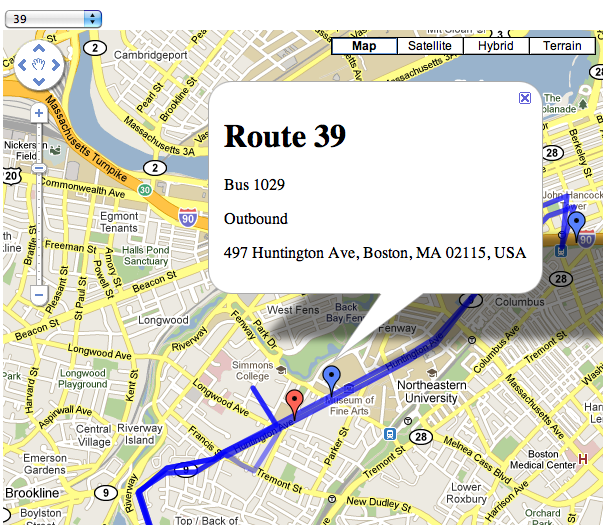
   <content type="html">&lt;p&gt;The &lt;span class=&quot;caps&quot;&gt;MBTA&lt;/span&gt; last night &lt;a href=&quot;http://www.universalhub.com/2010/mbta-expand-real-time-bus-info&quot;&gt;announced&lt;/a&gt; that they were adding additional routes to their real-time location feeds, with plans to have &lt;i&gt;all&lt;/i&gt; bus routes available by the end of the summer.  The new routes are 1, 4, 15, 22, 23, 28, 32, 57, 66, 71, 73, and 77.  My &lt;a href=&quot;http://mbta-bus.appspot.com/&quot;&gt;&lt;span class=&quot;caps&quot;&gt;MBTA&lt;/span&gt;/Google maps mash-up&lt;/a&gt; (&lt;a href=&quot;http://joeshaw.org/2009/11/15/633&quot;&gt;blog post&lt;/a&gt;) has incorporated these new feeds and will automatically include future ones.&lt;/p&gt;
&lt;p&gt;Right now inbound/outbound markers are not working due to a change in the MBTA&amp;#8217;s feed.  It&amp;#8217;s not clear if this was intentional or a bug, and I&amp;#8217;m not the &lt;a href=&quot;http://groups.google.com/group/massdotdevelopers/browse_thread/thread/29a781a0bfa70d6f&quot;&gt;only&lt;/a&gt; &lt;a href=&quot;http://groups.google.com/group/massdotdevelopers/browse_thread/thread/6e98ac23f5323969&quot;&gt;one&lt;/a&gt; who is having issues with it.&lt;/p&gt;</content>
 </entry>
 
 <entry>
   <title>avchd to mp4/h264/aac conversion</title>
   <link href="http://joeshaw.org//2010/04/10/655/"/>
   <published>2010-04-10T10:28:03-04:00</published>


   <updated>2010-04-10T10:28:03-04:00</updated>
   <id>http://joeshaw.org//2010/04/10/655</id>
   <content type="html">&lt;p&gt;For posterity:&lt;/p&gt;
&lt;p&gt;I have a &lt;a href=&quot;http://www.amazon.com/gp/product/B001OI2Z2I?ie=UTF8&amp;tag=joeshaw-20&amp;linkCode=as2&amp;camp=1789&amp;creative=390957&amp;creativeASIN=B001OI2Z2I&quot;&gt;Canon HF200 HD video camera&lt;/a&gt;, which records to &lt;span class=&quot;caps&quot;&gt;AVCHD&lt;/span&gt; format. &lt;span class=&quot;caps&quot;&gt;AVCHD&lt;/span&gt; is H.264 encoded video and AC-3 encoded audio in a &lt;span class=&quot;caps&quot;&gt;MPEG&lt;/span&gt;-2 Transport Stream (m2ts, mts) container.  This format is not supported by Aperture 3, which I use to store my video.&lt;/p&gt;
&lt;p&gt;With &lt;a href=&quot;http://www.0xdeadbeef.com/&quot;&gt;Blizzard&lt;/a&gt;&amp;#8217;s help, I figured out an ffmpeg command-line to convert to H.264 encoded video and &lt;span class=&quot;caps&quot;&gt;AAC&lt;/span&gt; encoded audio in an &lt;span class=&quot;caps&quot;&gt;MPEG&lt;/span&gt;-4 (mp4) container.  This is supported by Aperture 3 and other Quicktime apps.&lt;/p&gt;
&lt;p&gt;&lt;tt&gt;$ ffmpeg -sameq -ab 256k -i input-file.m2ts -s hd1080 output-file.mp4 -acodec aac&lt;/tt&gt;&lt;/p&gt;
&lt;p&gt;Command-line order is important, which is infuriating.  If you move the &lt;tt&gt;-s&lt;/tt&gt; or &lt;tt&gt;-ab&lt;/tt&gt; arguments, they may not work.  Add &lt;tt&gt;-deinterlace&lt;/tt&gt; if the source videos are interlaced, which mine were originally until I turned it off.  The only downside to this is that it generates huge output files, on the order of 4-5x greater than the input file.&lt;/p&gt;
&lt;p&gt;&lt;strong&gt;Update, 28 April 2010:&lt;/strong&gt; Alexander Wauck emailed me to say that re-encoding the video isn&amp;#8217;t necessary, and that the existing H.264 video could be moved from the m2ts container to the mp4 container with a command-line like this:&lt;/p&gt;
&lt;p&gt;&lt;tt&gt;$ ffmpeg -i input-file.m2ts -ab 256k -vcodec copy -acodec aac output-file.mp4&lt;/tt&gt;&lt;/p&gt;
&lt;p&gt;And he&amp;#8217;s right&amp;#8230; as long as you don&amp;#8217;t need to deinterlace the video.  With the whatever-random-ffmpeg-trunk checkout I have, adding &lt;tt&gt;-deinterlace&lt;/tt&gt; to the command-line segfaults.  I actually had tried &lt;tt&gt;-vcodec copy&lt;/tt&gt; early in my experiments but abandoned it after I found that it didn&amp;#8217;t deinterlace.  I had forgotten to try it again after I moved past my older interlaced videos.  Thanks Alex!&lt;/p&gt;</content>
 </entry>
 
 
</feed>